Question: I want to add layer pads but not to all of the layers, just some of them. How do I do this?
Answer: Calculate your pallet and once you are in the Detailed Solutions window, use the Layer Editor (available through the Tools menu) to select each layer and add the pads. There's a movie that explains all of this, here (requires QuickTime).
Monday, April 24, 2006

Wednesday, April 19, 2006
Universal Support In Mac OSX
Question: Will Quick Pallet Maker for Mac OSX be available as a Universal application (i.e. for Intel-Macs)? When?
Answer: Yes. As soon as the people at RealSoftware (QPM is built using their tools) release the new version of their IDE that supports Universal compiles, we'll build and test a Universal Quick Pallet Maker version. In the meantime and in case you have bought a new Intel Mac, QPM should run well through Rosetta emulation.
Answer: Yes. As soon as the people at RealSoftware (QPM is built using their tools) release the new version of their IDE that supports Universal compiles, we'll build and test a Universal Quick Pallet Maker version. In the meantime and in case you have bought a new Intel Mac, QPM should run well through Rosetta emulation.
Saturday, April 15, 2006
SVG Support in QPM
Question: I have just tried the Box Export to SVG drawing. This type of drawing can be opened with Adobe Illustrator. Advanced users might add their logo to the box. When will QPM import the elaborated box to create pallet layouts with customized boxes?
Answer: We are currently working on extending the SVG export capabilities of Quick Pallet Maker to make it easier for users to customize the reports they make through XSLT templates or simply by using find-replace within a text editor. For example, the SVG pallet drawing below (Adobe Plugin and/or SVG-enabled browser required) will render the pallet in blue.
A quick find+replace changes the pallet color to red.
Hence, we will extend the functionality for the user to be able to replace each box in the pallet for a SVG design of their own. We will let people know when this is completed.
Answer: We are currently working on extending the SVG export capabilities of Quick Pallet Maker to make it easier for users to customize the reports they make through XSLT templates or simply by using find-replace within a text editor. For example, the SVG pallet drawing below (Adobe Plugin and/or SVG-enabled browser required) will render the pallet in blue.
A quick find+replace changes the pallet color to red.
Hence, we will extend the functionality for the user to be able to replace each box in the pallet for a SVG design of their own. We will let people know when this is completed.
Thursday, April 06, 2006
Updated Screenshots
In the following link, you can see the new movies we have added to the screenshots page.
Tuesday, April 04, 2006
Fitter, Happier, More Productive
Our excuses to RadioHead, but that's how you can describe the container loading fixes in Quick Pallet Maker 4.0.4. "Fitter" because we haven't made it crash in a long while, "Happier" because the results are of higher quality (including setting a weight limit to a container and finding out that the pallets or boxes that didn't fit were moved to another container) and "More Productive"... (do we really have to explain that?).
This new version is available for download here. For a list of changes, please visit this link. There's an updated list of examples (with QuickTime movies included) here.
This new version is available for download here. For a list of changes, please visit this link. There's an updated list of examples (with QuickTime movies included) here.
Thursday, March 02, 2006
Corrugated Carton Flutes
Question: How do I select the corrugated carton flutes and what do they represent?
Answer: The corrugated carton flutes represent the different carton construction types. Within Quick Pallet Maker, the main purpose of their selection is to determine the thickness of the box walls in order to calculate the space the boxes take. This thickness can be overruled by entering the values in the cells at the right of the carton construction selector. You can find more information in the internet through web pages such as this one.
Answer: The corrugated carton flutes represent the different carton construction types. Within Quick Pallet Maker, the main purpose of their selection is to determine the thickness of the box walls in order to calculate the space the boxes take. This thickness can be overruled by entering the values in the cells at the right of the carton construction selector. You can find more information in the internet through web pages such as this one.
Saturday, February 25, 2006
Automatic Input
Question: Can Quick Pallet Maker be used for plugging into a third-party application so it can import data from my order system and then export it into another system of mine?
Answer: We're working on it. We will create a version of Quick Pallet Maker without an interface that can be executed remotely, import instructions and produce automatically a shipment file, all in XML. The advantage of using XML is that first it is a easy to read format (either by software parsers or by the naked eye) and second that the files can easily be transformed into whichever format you need for your application and back. We will post the developer information as we finish this upgrade.
Answer: We're working on it. We will create a version of Quick Pallet Maker without an interface that can be executed remotely, import instructions and produce automatically a shipment file, all in XML. The advantage of using XML is that first it is a easy to read format (either by software parsers or by the naked eye) and second that the files can easily be transformed into whichever format you need for your application and back. We will post the developer information as we finish this upgrade.
Thursday, February 09, 2006
Quick Pallet Maker 4.0.3 Ready
Tuesday, February 07, 2006
Multi-Packs
Question: Can you use Quick Pallet Maker to calculate multiple types of primary packages in a box?
Answer: Short answer: not yet. Long answer: yes, you can calculate multi-packs in a two-step process.
First, open a new Container Fill window and enter the box internal dimensions in the container dimensions slots. Then, create new boxes with the primary package dimensions and their amounts. Add the boxes to the list and check the "optimize sections" box in the bottom left section of the window and then click on the second tab. The result should show how the packages would look.
The second part of this procedure is to calculate the box arrangements in pallets by using a new document window starting from Box Dimensions.
Answer: Short answer: not yet. Long answer: yes, you can calculate multi-packs in a two-step process.
First, open a new Container Fill window and enter the box internal dimensions in the container dimensions slots. Then, create new boxes with the primary package dimensions and their amounts. Add the boxes to the list and check the "optimize sections" box in the bottom left section of the window and then click on the second tab. The result should show how the packages would look.
The second part of this procedure is to calculate the box arrangements in pallets by using a new document window starting from Box Dimensions.
Using The Box Fill Feature
Question: How do you use the Box Fill feature?
Answer: Here's an example. If you wish to change the default boxes, please refer to this other example.
Answer: Here's an example. If you wish to change the default boxes, please refer to this other example.
Monday, February 06, 2006
Where Are The Instructions?
Question: Do you have a user manual for Quick Pallet Maker?
Answer: Yes, you can find the updated HTML manual under the Help menu in the QPM application and also in the following link. You can also download an older PDF manual that covers up to version 3.3. through this link. There's also a version in Spanish here. We also recommend taking a look at the examples page. If there is something that we may have not covered, please feel free to contact product support.
Answer: Yes, you can find the updated HTML manual under the Help menu in the QPM application and also in the following link. You can also download an older PDF manual that covers up to version 3.3. through this link. There's also a version in Spanish here. We also recommend taking a look at the examples page. If there is something that we may have not covered, please feel free to contact product support.
Loading Drums Onto Pallets & Containers
Question: How do I load drums or cylinders onto pallets and then onto containers?
Answer: Here's an example on how to do it.
Answer: Here's an example on how to do it.
Tuesday, January 24, 2006
Update Notices
Question: How come you do not send update email notices anymore?
Answer: Starting from version 4.0., if an internet connection is available, Quick Pallet Maker will check our servers to see if there is a newer version available. If so, a small window will appear indicating the new version. This is much better than adding to the current email congestion and less work for all parties. Just make sure that you have downloaded at least version 4.0 to be in the loop.
Answer: Starting from version 4.0., if an internet connection is available, Quick Pallet Maker will check our servers to see if there is a newer version available. If so, a small window will appear indicating the new version. This is much better than adding to the current email congestion and less work for all parties. Just make sure that you have downloaded at least version 4.0 to be in the loop.
Quick Pallet Maker 4.0.2 Ready
Sunday, January 22, 2006
Chinese Version Doesn't Look Well
Question: I am using the Chinese Simplified version of Quick Pallet Maker and the characters do not appear in all of the windows. What can I do?
Answer: If you had been using a non-Chinese font prior to the use of Quick Pallet Maker or if the System font is a non-Chinese font, then you need to change the QPM font to a Chinese font. To do this, run QPM and open a new window starting from Primary Package, select a Chinese font from the Edit menu and then quit QPM. Once you run QPM again, you should see all the characters correctly.
Answer: If you had been using a non-Chinese font prior to the use of Quick Pallet Maker or if the System font is a non-Chinese font, then you need to change the QPM font to a Chinese font. To do this, run QPM and open a new window starting from Primary Package, select a Chinese font from the Edit menu and then quit QPM. Once you run QPM again, you should see all the characters correctly.
Container Not In The List
Question: How come the list of containers does not include the 40' High Cube container?
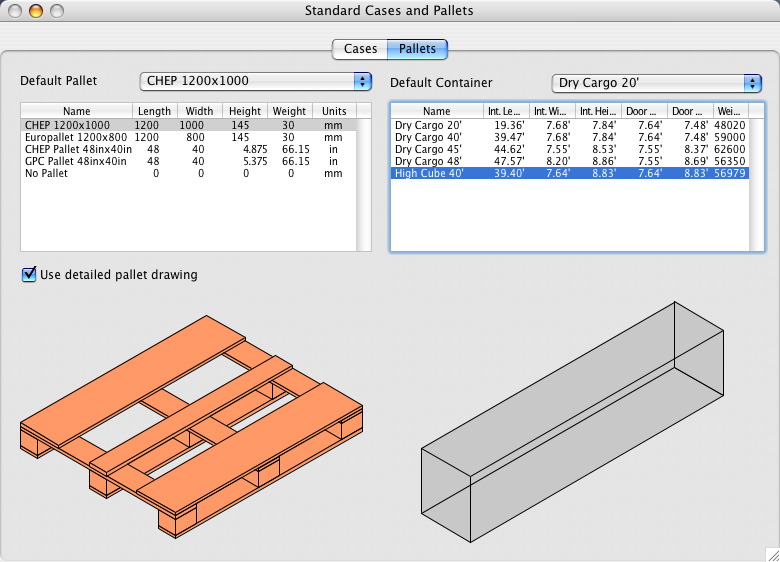
Answer: When we set up the defaults, we used the first containers that would come to mind. However, it is very easy to add more types and/or edit the ones that already exist. To add a new container, open the Standard Cases and Pallets window and choose one from the list. Then, use the "Duplicate" command from the Edit menu to create a replica at the bottom of the list. To edit any of the container dimensions or the container name, double-click the appropriate cell and change the values. For an example, see the bottom screenshot.

Answer: When we set up the defaults, we used the first containers that would come to mind. However, it is very easy to add more types and/or edit the ones that already exist. To add a new container, open the Standard Cases and Pallets window and choose one from the list. Then, use the "Duplicate" command from the Edit menu to create a replica at the bottom of the list. To edit any of the container dimensions or the container name, double-click the appropriate cell and change the values. For an example, see the bottom screenshot.
Thursday, January 19, 2006
Big XML Files
Question: The container XML files that are produced by Quick Pallet Maker sometimes take up too much disk space. What can I do if I want to send it to someone, for example?
Answer: In some cases, there are containers that can have a large amount of boxes or pallets. Each box and pallet is represented by it's own branch in the XML tree of the container file. However, since the files are text files, they can be easily compressed in the .zip format with the utilities that are available in Windows XP and in the Mac OSX operating systems. For people using older OSes, you can download WinZip for Windows or use Stuffit, which is included in Mac OS. Compression is very effective. For example, a 12.8MB container file can be compressed to 108KB (easily emailed).
Answer: In some cases, there are containers that can have a large amount of boxes or pallets. Each box and pallet is represented by it's own branch in the XML tree of the container file. However, since the files are text files, they can be easily compressed in the .zip format with the utilities that are available in Windows XP and in the Mac OSX operating systems. For people using older OSes, you can download WinZip for Windows or use Stuffit, which is included in Mac OS. Compression is very effective. For example, a 12.8MB container file can be compressed to 108KB (easily emailed).
Friday, January 06, 2006
Differences Between Windows and Mac Versions
Question: Are there any differences between the Windows and Mac OSX versions of Quick Pallet Maker?
Answer: No. Both versions work exactly the same, even if the appearance is somewhat different due to the operating systems. The registration numbers also work the same, so if you buy a license for Windows and then change to a Mac, or vice-versa, your license number will work (just remember to uninstall QPM from the previous machine). However, since QuickTime is included with Mac OSX and not necessarily included in your Windows PC, it is important to download it from the Apple website.
Answer: No. Both versions work exactly the same, even if the appearance is somewhat different due to the operating systems. The registration numbers also work the same, so if you buy a license for Windows and then change to a Mac, or vice-versa, your license number will work (just remember to uninstall QPM from the previous machine). However, since QuickTime is included with Mac OSX and not necessarily included in your Windows PC, it is important to download it from the Apple website.
Thursday, January 05, 2006
"Demo" or "Purchase"?
Question: I already paid for the application. However, when I install it in Windows, the installation program asks me if I want to run it as a Demo or if I want to purchase it. What should I do?
Answer: Click "Demo". If you have paid for the application and registered it correctly, Quick Pallet Maker should be able to recognize your registration information and run normally. If you want to purchase another license, you can click on "Purchase".
Answer: Click "Demo". If you have paid for the application and registered it correctly, Quick Pallet Maker should be able to recognize your registration information and run normally. If you want to purchase another license, you can click on "Purchase".
Tuesday, January 03, 2006
Container Movie Export Is Slow
Question: How come the Container Movie export process is unbearably slow? I am using Windows XP and it says that the application (Quick Pallet Maker) does not respond.
Answer: The real answer to this question is that the container movie export code was copied from the pallet movie export code. Although the speed is OK for pallets with not so many boxes, it really slows down when exporting container movies with more than a thousand boxes, for example. This is because each frame has the size of the drawing and there are more than a thousand frames. If you were exporting a container full of pallets, it would be faster. Anyhow, although Windows is telling you that the application does not respond, you can wait it out to get your movie. Just make sure that you have installed Apple QuickTime.
Since we don't want to waste your time, we just wrote a different method for exporting movies that is much faster. We will include it in Quick Pallet Maker 4.0.2, which is our next update. For those of you who can't wait, you can download the English version for Windows here and for Mac OSX here.
Answer: The real answer to this question is that the container movie export code was copied from the pallet movie export code. Although the speed is OK for pallets with not so many boxes, it really slows down when exporting container movies with more than a thousand boxes, for example. This is because each frame has the size of the drawing and there are more than a thousand frames. If you were exporting a container full of pallets, it would be faster. Anyhow, although Windows is telling you that the application does not respond, you can wait it out to get your movie. Just make sure that you have installed Apple QuickTime.
Since we don't want to waste your time, we just wrote a different method for exporting movies that is much faster. We will include it in Quick Pallet Maker 4.0.2, which is our next update. For those of you who can't wait, you can download the English version for Windows here and for Mac OSX here.
Subscribe to:
Posts (Atom)